Showing posts with label html. Show all posts

How To Add Smart Jquery Featured Slider to Blogger/Websites


This is a another tutorial about, how to add great featured jquery content slider to your blogger blog or other website.Read the instruction given below to add this featured content slider to your blog with in few minutes.Remember to use 307px width and 254px height images for this slider.I recommend to DOWNLOAD java script files and host it yourself.Also you can see the DEMO of this slider HERE.

1.Login to your blogger dashboard--> Design - -> Edit HTML.

2.Scroll down to where you see tag .

3.Copy below code and paste it just before the tag .


4.Now save your template.

5.Go to Layout --> Page Elements.

6.Click on 'Add a Gadget'.

7.Select 'HTML/Javascript' and add the code given below:


NOTE : Replace,

SLIDE-X-LINK-HERE with your real featured posts links.

SLIDE-X-IMAGE-ADDRESS-HERE with your real slide images addresses.

Look at the example below:


You are done.


How To Create JQuery Featured Content Slideshow


In this tutorial I am going to explain,how to create a slideshow to show your featured content to visitors.This is very easy to add and configure.This slideshow is working using jquery.You do not want to host any java script file yourself to add this slideshow to your blog.So you can add this slideshow to your site with in few minutes.Default width=600px and height=240px.But you can change it easily to match it for your website.

If you like add this slideshow to your blogger blog or website,then follow the steps given below.


1.Login to your blogger dashboard--> Design - -> Edit HTML.

2.Scroll down to where you see tag .

3.Copy below code and paste it just before the tag .


4.Now save your template.

5.Go to Layout --> Page Elements.

6.Click on 'Add a Gadget'.

7.Select 'HTML/Javascript' and add the code given below:


You can add more slides as you like.

Note : Replace images URLs,"This is featured post X title","Replace This Text With Your Featured Post X Description" with your content.

You are done.


How To Embed URL,HTML,Forum Links Code below Blogger Posts


This tutorial will explain how to create a widget, for your visitors to link back to your article/blogger post.This was created by me(http://www.bloggertipandtrick.net/) and previously I had installed this widget to this site.Many visitors ask from me how to add this widget to their blogger blogs and so I decided to explain it.This widget will show 3 codes (Blog Post URL,HTML code to embed your post to a website,Forum Link to embed your post to a forum) below your blogger post.If you like to add this widget to your blogger blog,then follow the steps given below.

1.Login to your blogger dashboard--> layout- -> Edit HTML

2.Scroll down to where you see tag .

3.Copy below code and paste it just before the tag .


4.Now find below code:

5.Copy below code and paste it just after the .

If you find this article useful, please feel free to link to this page from your website or blog.


Widget by BloggerTipAndTrick


NOTE : Don't change anything in above code.

6.Save your template and you are done.


How To Change Colors of Selected/Highlighted Texts


This tutorial will explains to you how to change colors of your selected/highlighted texts and selected text's backgrounds.This is very easy to do,But have a one problem,this method is not working in Internet explorer.But I think this will helpful to you add some attraction to your website.Follow the steps given below to do this.

1.Login to your blogger dashboard--> layout- -> Edit HTML

2.Scroll down to where you see tag .

3.Copy below code and paste it just before the tag .


Note : You can change colors as you like.

4.Now save your template.You are done.

Look at the picture given below.


How To Add Beautiful Subscribe Section to Blogger


Do you like to add a good looking Subscribe section to your blog?Then simply follow the steps below.

1.Login to your blogger dashboard--> layout- -> Edit HTML

2.Scroll down to where you see tag .

3.Copy below code and paste it just before the tag .


NOTE : Host RSS.png , EmailRSS.png , twitter.png yourself.


4.Now go to Layout-->Page Element and click on "Add a gadget".

5.Select "html/java script" and add the code given below and click save.


NOTE : Replace YOUR-RSS-FEED-URL , YOUR-FEEDBURNER-EMAIL-SUBSCRIPTION-URL , YOUR-TWITTER-URL with your urls.

Look at the example below:


You are done.


How to Add Multi Tabbed Section to Blogger


To add a nice multi tab section to your blog follow the steps given below.

1.Login to your blogger dashboard--> layout- -> Edit HTML

2.Scroll down to where you see tag .

3.Copy below code and paste it just before the tag .

How to Add Multi Tabbed Section


Note : Host bullet.gif image yourself.

HOST THIS

4.Now go to Layout-->Page Element and click on "Add a gadget".

5.Select "html/java script" and add the code given below and click save.


Recent Post


    ENTER-TAB-1-CONTENT


Recent Comments


    ENTER-TAB-2-CONTENT


Archives


    ENTER-TAB-3-CONTENT


Note:

Replace ENTER-TAB-1-CONTENT , ENTER-TAB-2-CONTENT , ENTER-TAB-3-CONTENT with your content.

And also you can change Tabs Names.(Red coloured text)

You are done.


How To Add Featured Post Content Slider to Blogger


This is very smart featured post content slider for your blogger blog or any other site.You can easily add or remove slides to this widget.And also very easy to configure.To add it to your site follow the steps given below.You can see the demo of this widget HERE.

1.Login to your blogger dashboard--> layout- -> Edit HTML

2.Scroll down to where you see tag .

3.Copy below code and paste it just before the tag .


Note : Host prev.png and nxt.png images yourself.


4.Now go to Layout-->Page Element and click on "Add a gadget".

5.Select "html/java script" and add the code given below and click save.


Note : Replace URL-of-Post-X , Title-of-Post-X , Slide X Description [...] , Slide-X-Image-Address with your content.

Use width=270px and height=170px images for your slides.

And also you can add many more slide to this widget.

For example look at the code below:


  • Avatar (2009 film)


    James Cameron's epic motion picture, Avatar - in cinemas December 18th worldwide. In the epic action adventure AVATAR, James Cameron, the director of "Titanic," takes us to a spectacular new world beyond our imagination. On the distant moon Pandora, a reluctant hero embarks on a journey of redemption and discovery as he leads a heroic battle to save a civilization. [...]



  • 2012 Movie


    The film briefly references Mayanism, the Mesoamerican Long Count calendar, and the 2012 phenomenon in its portrayal of cataclysmic events unfolding in the year 2012. Because of solar flare bombardment the Earth's core begins heating up at an unprecedented rate, eventually causing crustal displacement. This results in an onslaught of Doomsday event scenarios plunging [...]


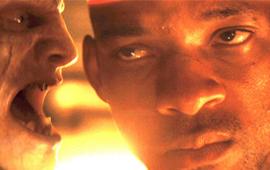
  • I am Legend Movie


    The film briefly references Mayanism, the Mesoamerican Long Count calendar, and the 2012 phenomenon in its portrayal of cataclysmic events unfolding in the year 2012. Because of solar flare bombardment the Earth's core begins heating up at an unprecedented rate, eventually causing crustal displacement. This results in an onslaught of Doomsday event scenarios plungingThe novel's main character is Robert Neville, apparently the sole survivor of a pandemic the symptoms of which resemble vampirism. The author details Neville's [...]


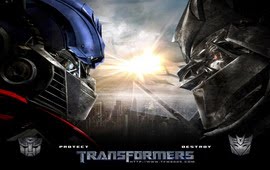
  • Transformer Movie


    Transformers is a 2007 live-action-thriller film adaptation of the Transformers franchise, directed by Michael Bay and written by John Rogers, Roberto Orci and Alex Kurtzman. It stars Shia LaBeouf as Sam Witwicky, a teenager involved in a war between the heroic Autobots and the evil Decepticons, two factions of alien robots who can disguise themselves by transforming into everyday machinery. The Decepticons desire control of the All Spark, the object that created their robotic race, with the intention of using it to build [...]


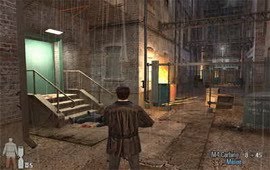
  • Max Payne Game


    Max Payne is a BAFTA award winning[1] third-person shooter video game developed by Finnish Remedy Entertainment, produced by 3D Realms and published by Gathering of Developers in July 2001 for Windows. Ports later in the year for the Xbox, PlayStation 2 and the GameBoy Advance were published by Rockstar Games. A Macintosh port was published in July 2002 by MacSoft in[...]


Now you are done.

Look at the Demo of This Widget.


JQuery Multitab Widget For Blogger/Websites


This is another good multi tab view widget for your blog/website.Follow the steps given below to add it to your site.

1.Login to your blogger dashboard--> layout- -> Edit HTML

2.Scroll down to where you see tag .

3.Copy below code and paste it just before the tag .

JQuery Multitab Widget For Blogger


4.Now go to Layout-->Page Element and click on "Add a gadget".

5.Select "html/java script" and add the code given below and click save.


Tab 1 Content


Tab 2 Content


Tab 3 Content


Note : Replace Tab 1 Content,Tab 2 Content,Tab 3 Content with your contents.